Google เปิดตัว Developer Knowledge API เชื่อมต่อเอกสารทางการสู่ AI
7 ต.ค. 2026
หากคุณกำลังสร้าง AI agents หรือเครื่องมือสำหรับนักพัฒนาบน Google Cloud ถึงเวลาบอกลาการทำ web-scraping ที่เปาะบาง หรือการต่อสู้กับข้อจำกัดด้านข้อมูลย้อนหลัง (training cutoffs) ของโมเดลภาษาขนาดใหญ่ (LLM) ที่ล้าสมัยได้แล้ว
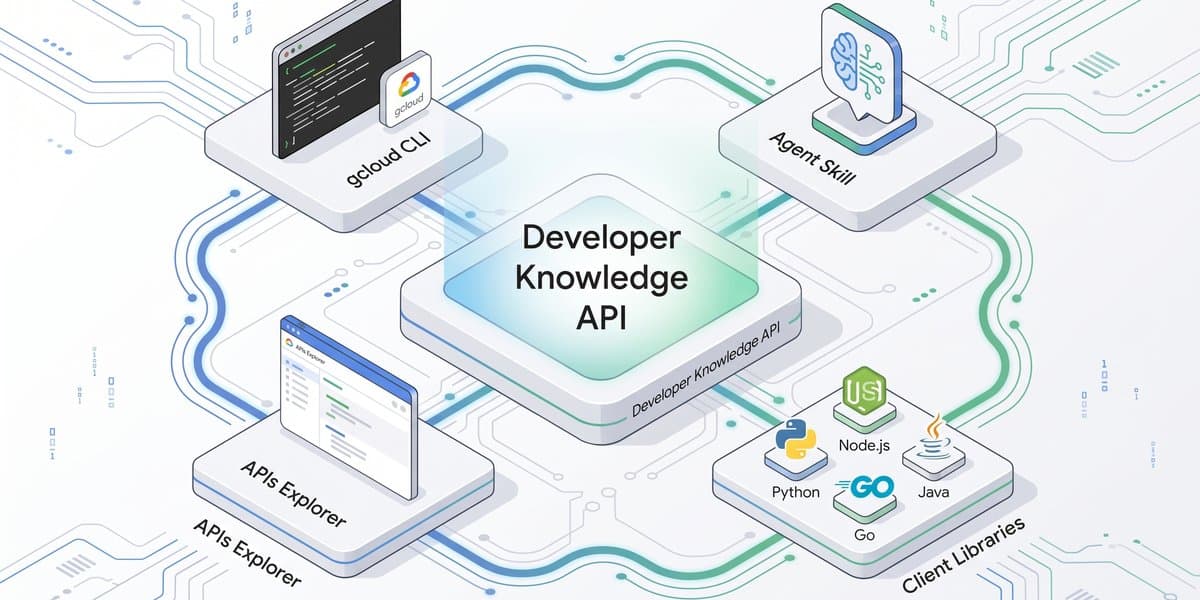
นักพัฒนาสามารถสร้างงานได้เร็วขึ้น ฉลาดขึ้น และมั่นใจยิ่งขึ้นด้วยระบบนิเวศ Google Developer Knowledge API ซึ่งรวมถึง gcloud CLI surface, agent skill อย่างเป็นทางการ, API Explorer และไลบรารีไคลเอนต์หลายภาษา เครื่องมือเหล่านี้จะส่งตรงเอกสารประกอบของ Google ให้คุณ ไม่ว่าคุณจะทำงานในเทอร์มินัล เขียน prompt ให้ AI agent หรือเขียนซอฟต์แวร์สำหรับใช้งานจริง
Developer Knowledge API คือแหล่งข้อมูลความจริง (source of truth) ทางโปรแกรมอย่างเป็นทางการของ Google สำหรับเอกสารนักพัฒนาเกี่ยวกับ Google Cloud, Firebase, Android และอื่นๆ โดยถูกออกแบบมาเพื่อ AI agents สมัยใหม่, IDE extensions และเวิร์กโฟลว์อัตโนมัติ API นี้จะเข้ามาแทนที่การทำ web-scraping ด้วยโครงสร้างข้อมูลที่ให้บริการเอกสารในรูปแบบ Markdown ที่ทันสมัย
ด้วยความสามารถในการค้นหาแบบ semantic และ keyword, การแบ่งส่วนเอกสารอัจฉริยะ (intelligent document chunking) และการตอบคำถามแบบมีหลักฐานอ้างอิง (grounded Q&A) ช่วยให้เอเย่นต์และเครื่องมือของคุณยังคงความแม่นยำและใช้ token อย่างมีประสิทธิภาพ นอกจากนี้ยังมีการทำดัชนีบ่อยครั้งเพื่อให้มั่นใจว่าข้อมูลมีความสดใหม่และมีความล่าช้าน้อยที่สุด
Developer Knowledge API gcloud CLI surface จะช่วยผสมผสานการค้นหาเอกสารและการตอบคำถามเข้ากับสภาพแวดล้อมบรรทัดคำสั่งของคุณ โดยติดตั้งมาให้ล่วงหน้าใน Cloud Shell และใช้งานได้กับ Google Cloud SDK บน Linux, macOS และ Windows
ความสามารถและคำสั่งหลัก:
answer-query : รับคำตอบที่มีหลักฐานอ้างอิงในเทอร์มินัลของคุณ
documents search-chunks : ค้นหาตัวอย่างและส่วนของเอกสาร (chunks) ในเอกสารทั้งหมดของ Google
documents describe : เรียกข้อมูล metadata และเนื้อหาสำหรับเอกสารเฉพาะ
# Get grounded answers
gcloud developer-knowledge answer-query --query="How do I create a BigQuery dataset?"
# Search document chunks
gcloud developer-knowledge documents search-chunks --query="Firestore transactions"
# Retrieve metadata and content for a specific document
gcloud developer-knowledge documents describe "documents/docs.cloud.google.com/storage/docs/creating-buckets"
# Troubleshoot an error trace by piping it directly into the answer-query command
gcloud developer-knowledge answer-query --query="$(cat error.txt)"
``` เพื่อเริ่มต้นใช้งาน gcloud CLI โปรดดู [gcloud CLI Quickstart](https://developers.google.com/knowledge/quickstart-gcloud?utm_campaign=cloud-ix-social-media-post_562111984)

[Developer Knowledge agent skill](https://github.com/google/skills/tree/main/skills/developers/retrieving-developer-knowledge) จะสร้างการเชื่อมต่อระหว่าง AI coding assistants และระบบนิเวศเอกสารของ Google ช่วยให้เครื่องมืออัตโนมัติเข้าถึงข้อกำหนดทางเทคนิคที่เป็นปัจจุบันได้ทันที

### ประโยชน์หลัก

*   **การอ้างอิงหลักฐานและลดการหลอน (Grounding & reduced hallucinations):** ให้ AI เข้าถึงเอกสารที่ทันสมัย ลดการหลอนข้อมูลจากข้อจำกัดของ LLM ที่ล้าสมัย
*   **การใช้ token และ context อย่างคุ้มค่า:** ใช้เวิร์กโฟลว์การเรียกข้อมูลหลายขั้นตอน เช่น `searchDocumentChunks` ก่อนที่จะดึงหน้า Markdown ฉบับเต็ม
*   **ความเข้ากันได้กับเครื่องมือที่กว้างขวาง:** รองรับการรวม MCP มาตรฐานกับ Claude Code, Cursor, GitHub Copilot และเฟรมเวิร์กเอเย่นต์อื่นๆ โดยใช้ [Developer Knowledge MCP server](https://developers.google.com/knowledge/mcp?utm_campaign=cloud-ix-social-media-post_562111984)

### การกำหนดค่า agent skill

กำหนดค่า skill โดยรันคำสั่งต่อไปนี้ในเทอร์มินัลของคุณ:

```bash
npx skills add google/skills --skill retrieving-developer-knowledge
คำสั่งนี้จะติดตั้ง skill ในโปรเจกต์ของคุณ เพื่อสอนผู้ช่วย AI ให้รู้จักวิธีใช้ MCP server หากต้องการเชื่อมต่อกับ IDE หรือกำหนดค่าการตรวจสอบสิทธิ์ โปรดดู Connect to the Developer Knowledge MCP server
client libraries ช่วยให้คุณฝังการเรียกเอกสารและการสร้างคำตอบที่มีหลักฐานอ้างอิงลงในระบบที่ใช้งานจริง, CI/CD pipelines และบอทความรู้ระดับองค์กร โดยรองรับภาษาที่หลากหลายและมีการจัดการข้อผิดพลาดที่ปรับให้เหมาะกับแต่ละภาษา
ตัวอย่างโค้ด:
ตัวอย่างวิธีที่ AI agent ใช้ไลบรารีไคลเอนต์ Python เพื่อดึงข้อมูลบันทึกการเปิดตัวล่าสุด เพื่อให้มั่นใจว่าคำตอบมีพื้นฐานมาจากข้อมูลปัจจุบัน:
from google.cloud import developer_knowledge_v1
def FetchMyProductReleaseNotes(my_product_name: str) -> str:
    """Fetches the latest release notes to bridge a model's knowledge cutoff."""
    # Initialize the Developer Knowledge API client
    my_api_client = developer_knowledge_v1.DeveloperKnowledgeClient()
    # Formulate a targeted query for the specific product's release notes
    my_search_query = f"{my_product_name} latest release notes"
    my_request = developer_knowledge_v1.SearchDocumentChunksRequest(
        query=my_search_query,
    )
    # Retrieve and return the relevant documentation chunks
    my_response = my_api_client.search_document_chunks(request=my_request)
    # Extract the chunk text
    my_release_notes = [my_chunk.text for my_chunk in my_response.chunks]
    return "\n".join(my_release_notes)
# Example usage:
# my_latest_notes = FetchMyProductReleaseNotes("Firestore")
สำหรับผู้ที่ต้องการทดลองโดยไม่ต้องเขียนโค้ด Google APIs Explorer สำหรับ Developer Knowledge API มีอินเทอร์เฟซแบบโต้ตอบเพื่อให้คุณทดสอบการเรียกใช้งาน API และตรวจสอบโครงสร้างการตอบกลับได้ง่ายๆ
หากคุณพร้อมที่จะรวมเอกสารเข้ากับเวิร์กโฟลว์ AI สามารถเริ่มต้นได้ทันทีผ่าน gcloud CLI surface หรือติดตั้ง agent skill ให้กับ AI coding assistant ของคุณ
ความคิดเห็น (0)
เข้าสู่ระบบเพื่อร่วมแสดงความเห็น
สมัครสมาชิกมาเป็นคนแรกที่แสดงความเห็นกันเลยโบร