
Scrape เว็บ 7,000 หน้าใน 3 นาทีด้วย Python และ Olostep
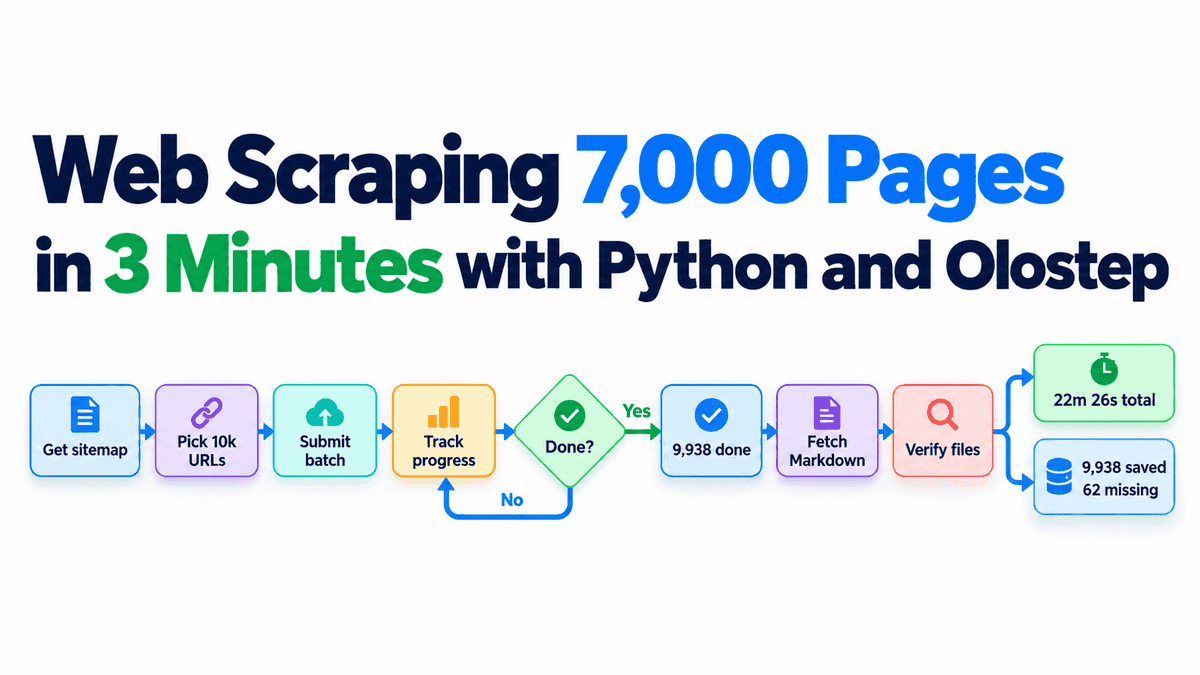
การ Scraping หน้าเว็บหลายพันหน้าอาจใช้เวลาหลายชั่วโมง โดยเฉพาะเมื่อต้องรวบรวมข้อมูลสำหรับแอปพลิเคชันระดับองค์กร การวิจัยตลาด หรือระบบ AI ขนาดใหญ่ ความท้าทายสำคัญไม่ใช่แค่ความเร็ว แต่คือความน่าเชื่อถือ การปรับขนาดได้ และการจัดการที่ง่ายดาย
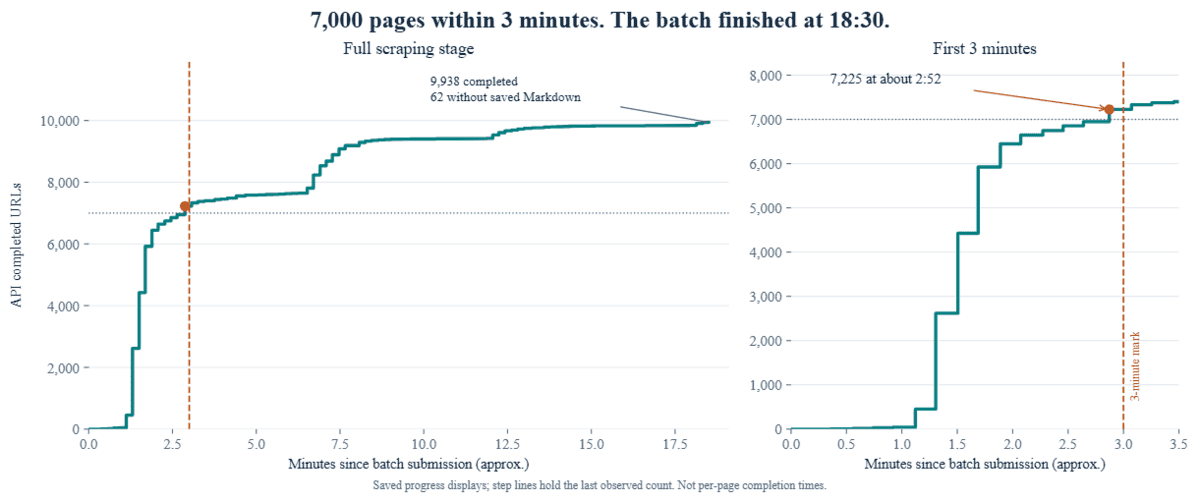
ผมได้ทดสอบการ Scrape หน้าเว็บ 10,000 หน้าด้วย Python และ Olostep Batch API พบว่าระบบประมวลผลไปถึง 7,225 หน้าในเวลาไม่ถึง 3 นาที อย่างไรก็ตาม กระบวนการทั้งหมดรวมการดาวน์โหลดและตรวจสอบผลลัพธ์ใช้เวลา 22 นาที 26 วินาที โดยเก็บข้อมูลเป็นไฟล์ Markdown ได้สำเร็จ 9,938 รายการ
ในบทช่วยสอนนี้ ผมจะแสดงวิธีใช้ Python และ Olostep เพื่อ Scrape ข้อมูลปริมาณมากในชุดเดียว (single batch) พร้อมแชร์ตัวเลขประสิทธิภาพจริงและจุดที่อาจทำให้กระบวนการทำงานช้าลง
ทำความเข้าใจการทำงานของ Olostep Batch API
Olostep Batch API ช่วยให้คุณส่ง URLs ได้สูงสุด 10,000 รายการในชุดเดียว แทนการส่งคำขอแยกกันหลายพันครั้ง โดยระบบจะจัดการการประมวลผลเบื้องหลังให้คุณติดตามความคืบหน้าและดึงผลลัพธ์ออกมาได้ทันที
ปัจจุบัน Olostep กำลังพัฒนาจากเครื่องมือ Scraping สำหรับนักพัฒนาไปสู่การเป็น โครงสร้างพื้นฐานข้อมูลเว็บสำหรับองค์กร (web data infrastructure for enterprises) ซึ่งสามารถประมวลผล 100,000 หน้าได้ในเวลาไม่ถึง 25 นาที เหมาะสำหรับบริษัทที่ต้องการข้อมูลวิจัยตลาดหรือข้อมูลเชิงลึกของคู่แข่งจำนวนมาก
สำหรับการทดสอบนี้ ผมใช้ Olostep Python SDK เพื่อ Scrape หน้าเอกสาร MDN จำนวน 10,000 หน้า โดยมีขั้นตอนหลัก 5 ขั้นตอน ได้แก่ การเตรียม URLs, การส่ง Batch, การติดตามความคืบหน้า, การดาวน์โหลดผลลัพธ์ และการตรวจสอบความถูกต้องของไฟล์
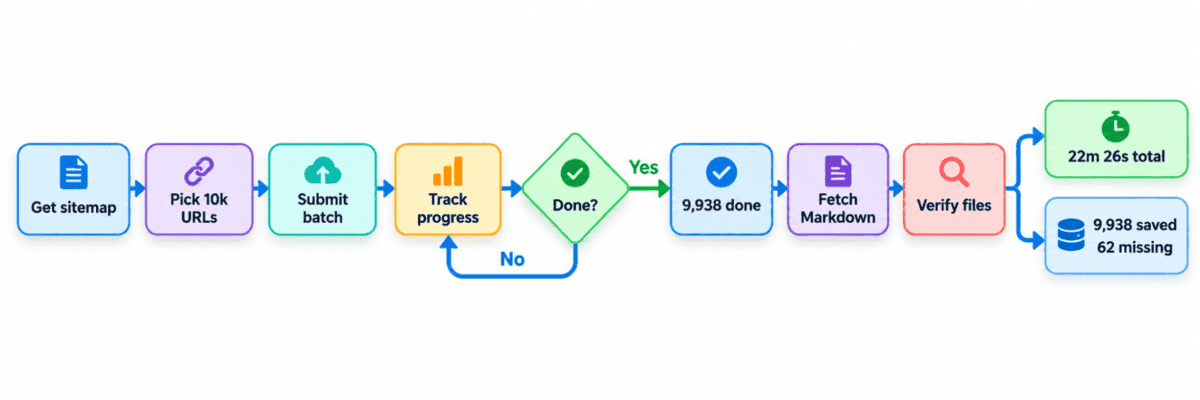
ข้อควรระวังคือ Batch ที่สถานะเสร็จสมบูรณ์ (completed) ไม่ได้หมายความว่าทุกหน้าถูกบันทึกสำเร็จ ในการทดสอบนี้มี 62 หน้าที่ขาดหายไป การตรวจสอบผลลัพธ์จึงสำคัญพอๆ กับความเร็ว เพื่อให้มั่นใจว่า pipeline ข้อมูลมีความน่าเชื่อถือสูง
การ Scrape 10,000 หน้าด้วย Olostep Batch API
การทดลองนี้ใช้ Python 3.13.15 และ Olostep SDK 1.2.2 โดยคุณต้องมี Olostep API key เพื่อดำเนินการตามขั้นตอนต่างๆ และควรตรวจสอบเครดิตในบัญชีให้เพียงพอก่อนรันโค้ด
1. ติดตั้ง SDK
ติดตั้ง Olostep Python SDK พร้อมกับ requests สำหรับดึง sitemap และ tqdm สำหรับสร้างแถบแสดงความคืบหน้าใน Jupyter Notebook
%pip -q install olostep==1.2.2 requests tqdm2. กำหนดค่า Client
ตั้งค่า Olostep client สร้างโฟลเดอร์เก็บข้อมูล และเขียนฟังก์ชันช่วยเหลือสำหรับการบันทึกไฟล์ รวมถึงการจัดการข้อผิดพลาดเบื้องต้นของ SDK
import asyncio, csv, gzip, hashlib, json, os, random, time
from datetime import datetime, timezone
from getpass import getpass
from pathlib import Path
from xml.etree import ElementTree as ET

import requests
from olostep import AsyncOlostep
from olostep.errors import OlostepClientError_ResponseValidationFailed
from olostep.models.response import BatchInfoResponse
from tqdm import tqdm

N = 10000
MAX_WAIT_SECONDS = 2400
DATA = Path("data"); DATA.mkdir(exist_ok=True)
client = AsyncOlostep(api_key=os.getenv("OLOSTEP_API_KEY") or getpass("Olostep API key: "))

def write_json(path, value):
    path.write_text(json.dumps(value, indent=2), encoding="utf-8")

def valid_file(path):
    try:
        return path.is_file() and bool(path.read_text(encoding="utf-8").strip())
    except (OSError, UnicodeError):
        return False

async def batch_info(batch_id):
    try:
        return await client.batches.info(batch_id)
    except OlostepClientError_ResponseValidationFailed as error:
        return BatchInfoResponse.model_validate({"parser": "none", **json.loads(error.response.body)})
3. สร้างชุดข้อมูล URL
ดาวน์โหลด sitemap ของ MDN และสุ่มเลือก URLs จำนวน 10,000 รายการที่ไม่ซ้ำกันเพื่อใช้ในการทดสอบ
source = "https://developer.mozilla.org/sitemaps/en-us/sitemap.xml.gz"

if not (DATA / "urls.csv").exists():
    response = requests.get(source, timeout=60); response.raise_for_status()
    payload = response.content
    xml = gzip.decompress(payload) if payload.startswith(b"\x1f\x8b") else payload
    (DATA / "mdn_sitemap.xml").write_bytes(xml)
    ns = {"s": "http://www.sitemaps.org/schemas/sitemap/0.9"}
    nodes = ET.fromstring(xml).findall("s:url", ns)
    urls = sorted({node.findtext("s:loc", namespaces=ns) for node in nodes})
    urls = [url for url in urls if url and url.startswith("https://developer.mozilla.org/en-US/docs/")]
    random.Random(42).shuffle(urls)
    assert len(urls) >= N, f"Only {len(urls)} unique documentation URLs available."
    with (DATA / "urls.csv").open("w", newline="", encoding="utf-8") as f:
        writer = csv.writer(f); writer.writerow(["url"]); writer.writerows([url] for url in urls[:N])
    write_json(DATA / "dataset.json", {"source": source, "downloaded_utc": datetime.now(timezone.utc).isoformat(),
                                     "available_urls": len(urls), "selected_urls": N, "random_seed": 42})

with (DATA / "urls.csv").open(encoding="utf-8", newline="") as f:
    urls = [row["url"] for row in csv.DictReader(f)]

assert len(urls) == len(set(urls)) == N
fingerprint = hashlib.sha256("\n".join(urls).encode()).hexdigest()
expected = {f"{i:05d}": url for i, url in enumerate(urls)}
print(f"Ready: {len(urls):,} unique URLs; source: {source}")
ผลลัพธ์:
Ready: 10,000 unique URLs; source: https://developer.mozilla.org/sitemaps/en-us/sitemap.xml.gz4. ส่งและติดตาม Batch
ส่ง URLs ทั้งหมดไปยัง Olostep และใช้แถบความคืบหน้าติดตามผล โดยโค้ดจะบันทึก Batch ID ไว้เผื่อกรณีที่ต้องรันงานต่อหากเกิดการขัดจังหวะ
checkpoint = Path("batch.json")
resumed = checkpoint.exists()

if resumed:
    run = json.loads(checkpoint.read_text(encoding="utf-8"))
    assert run["urls_sha256"] == fingerprint, "URL list changed; preserve the checkpoint before starting another batch."
else:
    started = time.time()
    batch = await client.batches.create(urls=[{"url": url, "custom_id": key} for key, url in expected.items()])
    run = {"batch_id": batch.id, "requested": N, "urls_sha256": fingerprint, "started_wall": started}
    write_json(checkpoint, run)

OUT = Path("output") / run["batch_id"]; OUT.mkdir(parents=True, exist_ok=True)
print("Resuming" if resumed else "Submitted", run["batch_id"])
wait_started = time.monotonic()

with tqdm(total=N, desc="Scraping", unit="page") as bar:
    while True:
        info = await batch_info(run["batch_id"])
        bar.update(max(0, info.completed_urls - bar.n))
        write_json(OUT / "progress.json", {"phase": "scraping", "status": info.status,
                   "processed": info.completed_urls, "total": N, "elapsed_seconds": round(time.time() - run["started_wall"], 2)})
        if info.status in ("completed", "failed"):
            break
        if time.monotonic() - wait_started > MAX_WAIT_SECONDS:
            raise TimeoutError("Batch still running. Rerun this cell to continue the same batch.")
        await asyncio.sleep(10)

run.setdefault("scrape_seconds", time.time() - run["started_wall"])
write_json(checkpoint, run)
print(f"Scraping stage finished: {info.status}; {info.completed_urls:,}/{N:,} completed.")
ข้อสังเกต: แม้ว่า Olostep จะจัดการได้ 7,225 หน้าในเวลาไม่ถึง 3 นาที แต่การจะประมวลผลให้ครบทั้งหมดจนถึงหน้าสุดท้ายต้องใช้เวลานานขึ้น รวมแล้วประมาณ 18 นาที 30 วินาทีสำหรับการ Scraping
5. ดาวน์โหลด Markdown
เมื่อ Scraping เสร็จ เราจะดึงข้อมูลมาบันทึกเป็นไฟล์ Markdown โดยใช้ระบบ ConcurrentRequests (สูงสุด 96 รายการพร้อมกัน) เพื่อเพิ่มความเร็ว
download_started = time.perf_counter()
limit = asyncio.Semaphore(96)
errors, scheduled, tasks = {}, set(), []
saved = set()
bar = tqdm(total=N, desc="Markdown saved", unit="file")

async def save_markdown(item):
    key = item.custom_id
    if key not in expected:
        return
    async with limit:
        path = OUT / f"{key}.md"
        if valid_file(path):
            saved.add(key); bar.update(1)
            return
        for attempt in range(2):
            try:
                async with asyncio.timeout(40):
                    content = (await item.retrieve(["markdown"])).markdown_content
                if not content or not content.strip():
                    errors[key] = "No Markdown content returned"
                    return
                path.write_text(content, encoding="utf-8")
                saved.add(key); bar.update(1)
                if len(saved) % 50 == 0:
                    write_json(OUT / "progress.json", {"phase": "downloading", "saved": len(saved), "total": N,
                               "elapsed_seconds": round(time.time() - run["started_wall"], 2)})
                return
            except Exception as error:
                errors[key] = str(error)
                if attempt == 0:
                    await asyncio.sleep(1)

async for item in client.batches.items(run["batch_id"], status="completed", batch_size=50, wait_for_completion=False):
    if item.retrieve_id and item.custom_id not in scheduled:
        scheduled.add(item.custom_id)
        tasks.append(asyncio.create_task(save_markdown(item)))

await asyncio.gather(*tasks)
bar.close()
download_seconds = time.perf_counter() - download_started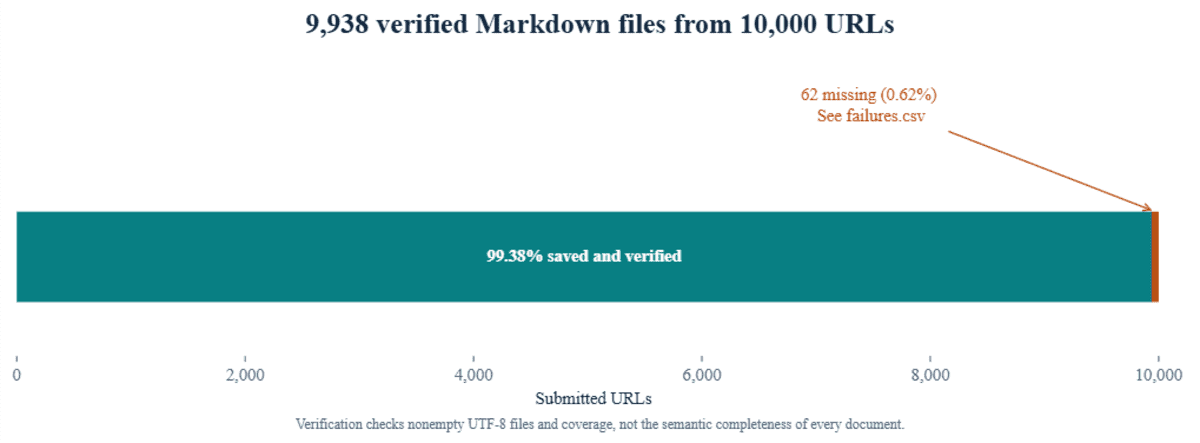
6. ตรวจสอบผลลัพธ์
ขั้นตอนสุดท้ายคือการยืนยันว่าจาก 10,000 URLs มีไฟล์ที่บันทึกสำเร็จกี่รายการ พร้อมสรุปเวลาทำงานทั้งหมดออกมาเป็นรายงาน
missing = {key for key in expected if not valid_file(OUT / f"{key}.md")}

with (OUT / "manifest.csv").open("w", newline="", encoding="utf-8") as f:
    writer = csv.writer(f); writer.writerow(["file", "url", "saved"])
    writer.writerows((f"{key}.md", url, key not in missing) for key, url in expected.items())

with (OUT / "failures.csv").open("w", newline="", encoding="utf-8") as f:
    writer = csv.writer(f); writer.writerow(["url", "error"])
    writer.writerows((expected[key], errors.get(key, "Missing result or failed scrape")) for key in sorted(missing))

total_seconds = time.time() - run["started_wall"]
summary = {"batch_id": run["batch_id"], "requested": N, "batch_status": info.status,
           "api_completed_urls": info.completed_urls, "saved_markdown": N - len(missing),
           "missing_markdown": len(missing), "all_saved": not missing, "resumed": resumed,
           "scrape_seconds": round(run["scrape_seconds"], 2), "download_seconds": round(download_seconds, 2),
           "total_seconds": round(total_seconds, 2),
           "all_saved_under_5_minutes": not resumed and not missing and total_seconds < 300}

write_json(OUT / "summary.json", summary)
write_json(OUT / "progress.json", {"phase": "finished", **summary})
print(json.dumps(summary, indent=2))
print("Files:", OUT.resolve())
print("All 10,000 Markdown files saved." if not missing else f"{len(missing):,} missing; see failures.csv.")
await client.close()
ข้อคิดส่งท้าย
จากการทดสอบด้วยปริมาณงานที่ต่างกัน สิ่งที่น่าแปลกใจคือความเร็วในช่วงเริ่มต้นนั้นสูงมาก แต่จะเริ่มช้าลงในช่วงท้ายของ Batch ข้อสรุปสำคัญคือแม้การ Scraping จะทำได้รวดเร็วในช่วงแรก แต่คุณควรวัดผลจากกระบวนการทั้งหมด (throughput) ตั้งแต่การส่งข้อมูลจนถึงการตรวจสอบไฟล์
การใช้ Olostep ร่วมกับ Python ช่วยให้การจัดการข้อมูลขนาดใหญ่ทำได้ง่ายกว่าที่คิด และความชัดเจนในผลลัพธ์ที่ขาดหายไปมีความสำคัญอย่างยิ่งต่อการทำ pipeline ข้อมูลสำหรับงานระดับองค์กรที่ต้องการความแม่นยำสูง
ความคิดเห็น (0)
เข้าสู่ระบบเพื่อร่วมแสดงความเห็น
สมัครสมาชิกมาเป็นคนแรกที่แสดงความเห็นกันเลยโบร