
วิธีสร้าง AI Web Scraper แบบง่ายด้วย Python เพื่อการดึงข้อมูลที่แม่นยำ
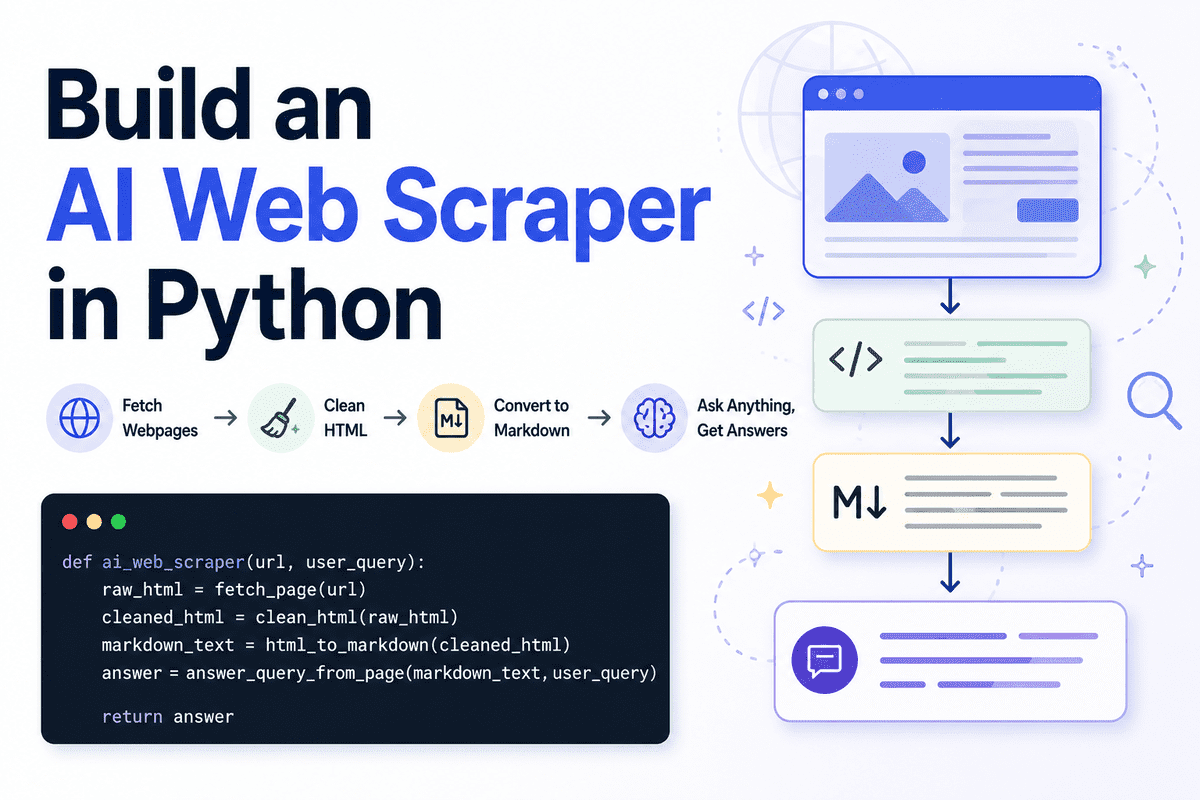
Web scraping คือกระบวนการรวบรวมข้อมูลจากเว็บไซต์โดยอัตโนมัติ โดยปกติแล้ว Scraper ทั่วไปจะดึงข้อความดิบ องค์ประกอบ HTML หรือเนื้อหาทั้งหน้าออกมา แต่สำหรับการสร้าง AI Agents หรือแอปพลิเคชันจากโมเดลภาษาขนาดใหญ่ (LLM) การส่งข้อมูลดิบทั้งหน้าเว็บไปยังโมเดลนั้นมักจะไม่ใช่ทางเลือกที่ดีที่สุด
แนวทางที่มีประสิทธิภาพกว่าคือการทำความสะอาดหน้าเว็บก่อน แล้วจึงแปลงเป็น Markdown จากนั้นจึงใช้ LLM เพื่อทำความเข้าใจเนื้อหาและส่งคืนเฉพาะคำตอบที่ตรงประเด็นตามความต้องการของผู้ใช้ วิธีนี้ช่วยให้ได้ผลลัพธ์ที่สะอาด อ่านง่าย และสามารถนำไปประยุกต์ใช้ใน Workflow อื่นๆ ได้ทันที
นอกจากนี้ การคัดกรองข้อมูลยังช่วยลดการใช้ Token ได้อย่างมาก แทนที่จะส่งข้อมูลที่ยุ่งเหยิงซึ่งเต็มไปด้วยลิงก์นำทาง ปุ่ม สคริปต์ หรือเนื้อหาส่วนท้าย (Footers) เราจะส่งเฉพาะเนื้อหาที่มีประโยชน์ไปยังโมเดลเท่านั้น ทำให้ LLM สามารถตอบกลับในรูปแบบ Markdown ที่กระชับและตรงจุด
ในคู่มือนี้ เราจะสร้าง AI Web Scraper แบบง่ายด้วย Python บน Jupyter Notebook ซึ่งมีคุณสมบัติตั้งแต่การดึงหน้าเว็บ การทำความสะอาด HTML การแปลงเป็น Markdown ไปจนถึงการใช้ AI ตอบคำถามจากเนื้อหาที่ดึงมาได้อย่างแม่นยำ
Setting Up
เราจะใช้ Jupyter Notebook สำหรับโปรเจกต์นี้เพื่อให้สามารถทดสอบแต่ละขั้นตอนได้ง่าย ก่อนที่จะพัฒนาต่อยอดเป็น API หรือแอปพลิเคชันตัวเต็มในอนาคต
เริ่มจากการติดตั้งแพ็กเกจ Python ที่จำเป็น:
!pip install requests beautifulsoup4 markdownify openai ftfy python-dotenv
``` โดยแต่ละเครื่องมือมีหน้าที่ดังนี้:

- **[requests](https://pypi.org/project/requests/)** สำหรับการดึงข้อมูลหน้าเว็บ
- **[BeautifulSoup](https://www.crummy.com/software/BeautifulSoup/)** สำหรับลบองค์ประกอบ HTML ที่ไม่จำเป็นออก
- **[markdownify](https://pypi.org/project/markdownify/)** สำหรับแปลง HTML ให้เป็นรูปแบบ Markdown
- **[OpenAI](https://pypi.org/project/openai/)** สำหรับประมวลผลคำตอบ
- **[ftfy](https://pypi.org/project/ftfy/)** สำหรับแก้ไขปัญหาการแสดงผลตัวอักษรที่ผิดเพี้ยน
- **[python-dotenv](https://pypi.org/project/python-dotenv/)** สำหรับการจัดการ API Key อย่างปลอดภัย

จากนั้นทำการ Import ไลบรารีที่ต้องใช้ใน Notebook:

```python
import os
import re
import requests

from bs4 import BeautifulSoup, Comment
from ftfy import fix_text
from markdownify import markdownify as markdownify_html
from openai import OpenAI
from dotenv import load_dotenv
from IPython.display import Markdown, display
ลำดับต่อมา ให้เตรียม OpenAI API Key โดยสร้างไฟล์ .env ไว้ในโฟลเดอร์เดียวกับ Notebook และระบุ Key ดังนี้:
OPENAI_API_KEY=your_api_key_hereทำการโหลดค่าจากไฟล์ .env เข้ามาในโปรเจกต์:
load_dotenv()

client = OpenAI(api_key=os.getenv("OPENAI_API_KEY"))
คุณควรตรวจสอบความถูกต้องของ Key และตรวจสอบว่าบัญชี OpenAI ของคุณมีการตั้งค่าการเรียกเก็บเงินเรียบร้อยแล้ว เนื่องจากบัญชี API ใหม่อาจต้องเติมเงินล่วงหน้าก่อนใช้งาน หากไม่พบโมเดลที่ต้องการ ให้เลือกใช้โมเดลอื่นที่มีอยู่ใน Dashboard ของคุณแทน
กำหนดชื่อโมเดลที่ต้องการใช้งาน:
MODEL_NAME = "gpt-5.4-nano"เราเลือกใช้โมเดลขนาดเล็กเนื่องจากงานนี้เน้นไปที่การอ่านเนื้อหาและสรุปข้อมูลที่ทำความสะอาดแล้ว ซึ่งไม่จำเป็นต้องใช้ทรัพยากรการประมวลผลที่สูงเกินไป
Fetching the Webpage
ฟังก์ชันแรกที่เราจะสร้างคือการดึง HTML ดิบจากหน้าเว็บเป้าหมายโดยใช้ไลบรารี requests ดังนี้:
def fetch_page(url: str) -> str:
    """
    Download the HTML content from a webpage.
    """
    headers = {
        "User-Agent": "SimpleAIScraper/1.0"
    }

response = requests.get(url, headers=headers, timeout=15)
    response.raise_for_status()

return response.text
การระบุ User-Agent ใน Header ช่วยลดโอกาสในการถูกบล็อกจากเว็บไซต์ ส่วนการกำหนด timeout และ raise_for_status() จะช่วยจัดการกรณีที่เว็บไซต์ไม่ตอบสนองหรือเกิดข้อผิดพลาด เช่น Error 404 หรือ 500
ทดสอบฟังก์ชันด้วยการดึงข้อมูลจากเว็บไซต์จริงและแสดงผล 500 ตัวอักษรแรก:
raw = fetch_page("https://www.olostep.com/")
print(raw[:500])
Raw HTML output | Image by Author
ในจุดนี้ ข้อมูลที่ได้จะยังคงเต็มไปด้วย HTML Tags และโค้ดส่วนเกินที่อ่านเข้าใจยาก
Cleaning the HTML
HTML ดิบมักมีส่วนประกอบที่ไม่เกี่ยวข้องกับการดึงเนื้อหา เช่น เมนูนำทาง ป๊อปอัป หรือสคริปต์ต่างๆ การทำความสะอาด HTML ก่อนส่งไปยัง LLM จึงสำคัญมาก เพราะช่วยลดสัญญาณรบกวนและประหยัดจำนวน Token
เราจะใช้ BeautifulSoup ในการวิเคราะห์และกำจัดส่วนที่ไม่จำเป็นออก:
def clean_html(html):
    html = fix_text(html)

soup = BeautifulSoup(html, "html.parser")

# Remove obvious noisy tags
    for tag in soup([
        "script", "style", "noscript", "svg", "img", "iframe",
        "nav", "header", "footer", "aside", "form", "button"
    ]):
        tag.decompose()

noise_words = [
        "cursor", "modal", "popup", "floating", "signup", "login",
        "cookie", "banner", "navbar", "menu", "footer", "header",
        "subscribe", "newsletter", "loading", "wait", "success",
        "auth", "w-nav", "w-form"
    ]

# First collect noisy tags
    tags_to_remove = []

for tag in soup.find_all(True):
        if tag.attrs is None:
            continue

class_value = tag.get("class", [])
        id_value = tag.get("id", "")

if isinstance(class_value, list):
            class_text = " ".join(class_value).lower()
        else:
            class_text = str(class_value).lower()

id_text = str(id_value).lower()

if any(word in class_text or word in id_text for word in noise_words):
            tags_to_remove.append(tag)

# Then remove them safely
    for tag in tags_to_remove:
        tag.decompose()

body = soup.body if soup.body else soup

return str(body)
กระบวนการนี้เริ่มจากแก้ไขการเข้ารหัสข้อความด้วย fix_text() จากนั้นจึงลบ Tag มาตรฐานที่ไม่มีเนื้อหาสำคัญ เช่น script หรือ nav รวมถึงการค้นหา Class หรือ ID ที่มีคำบ่งบอกว่าเป็นขยะอย่าง popup หรือ cookie เพื่อลบทิ้งอย่างปลอดภัย
เมื่อทดสอบรันฟังก์ชันทำความสะอาด:
clean = clean_html(raw)
print(clean[:500])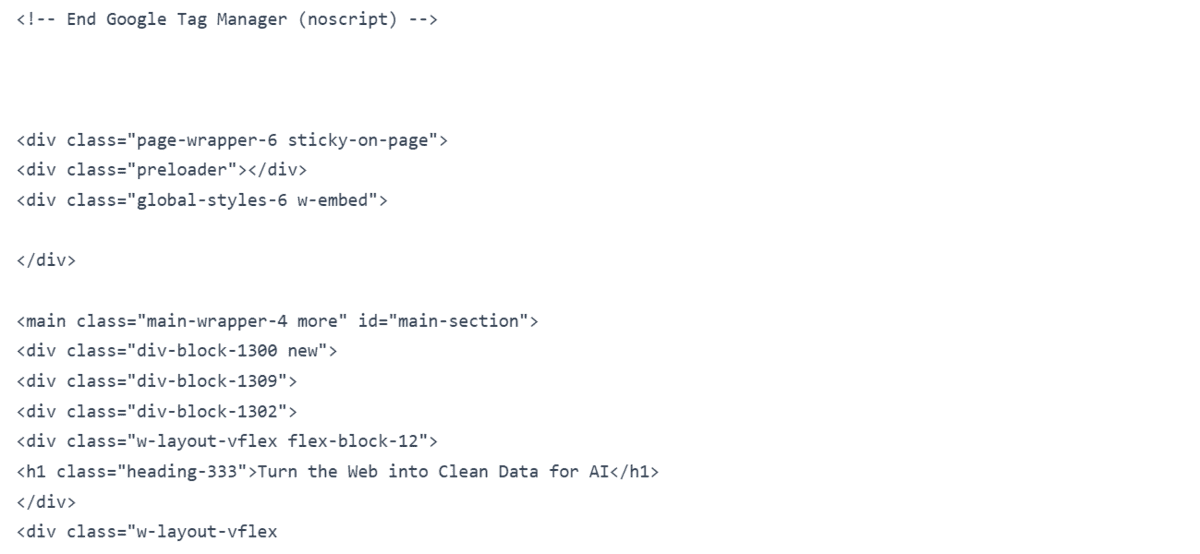
Cleaned HTML output | Image by Author
ผลลัพธ์ที่ได้จะเหลือเพียงโครงสร้างหลักที่มีเนื้อหาสำคัญ ช่วยให้ขั้นตอนถัดไปทำงานได้แม่นยำยิ่งขึ้น
Converting HTML to Markdown
ขั้นตอนต่อมาคือการแปลง HTML ที่คลีนแล้วให้เป็น Markdown ซึ่งเป็นรูปแบบที่ LLM ประมวลผลได้ดีที่สุด และยังช่วยลดขนาด Input ลงได้อีกทางหนึ่งด้วย
def html_to_markdown(html):
    markdown_text = markdownify_html(
        html,
        heading_style="ATX",
        bullets="-"
    )

markdown_text = fix_text(markdown_text)

# Remove image markdown
    markdown_text = re.sub(r"!\[.*?\]\(.*?\)", "", markdown_text)

# Remove extra spaces and blank lines
    markdown_text = re.sub(r"[ \t]+", " ", markdown_text)
    markdown_text = re.sub(r"\n{3,}", "\n\n", markdown_text)

lines = []

skip_lines = [
        "click to try", "wait...", "you've successfully reserved your spot.",
        "thank you! your submission has been received!",
        "oops! something went wrong while submitting the form.",
        "product", "resources", "company"
    ]

for line in markdown_text.splitlines():
        line = line.strip()

if not line:
            continue

if line.lower() in skip_lines:
            continue

lines.append(line)

return "\n".join(lines)
เรากำหนดสไตล์หัวข้อเป็น ATX (ใช้เครื่องหมาย #) และลบลิงก์รูปภาพออกเพราะไม่จำเป็นสำหรับการตอบคำถามข้อความ รวมถึงการกรองบรรทัดที่เป็นข้อความขยะ (CTA) ที่อาจหลุดรอดมาเพื่อให้เนื้อหาที่ส่งไปหา AI มีแต่เนื้อล้วนๆ
md = html_to_markdown(clean)
print(md[:500])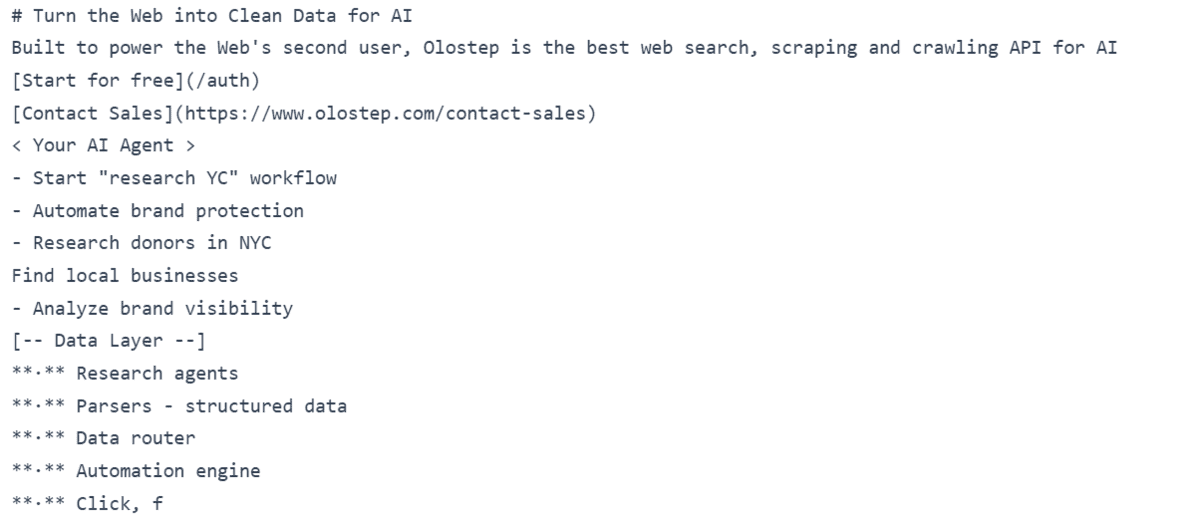
Markdown output | Image by Author
Asking a User Query Against the Page
ขั้นตอนนี้จะเป็นการส่ง Markdown ไปยัง LLM พร้อมกับคำถามของผู้ใช้ เพื่อให้ AI ค้นหาและสรุปคำตอบจากเนื้อหาที่มีอยู่เท่านั้น
def answer_query_from_page(markdown_text, user_query):
    prompt = f"""
You are an AI web scraping assistant.
You will receive Markdown extracted from a webpage.
Your task is to answer the user's query using only the useful page content.

User query:
{user_query}

Webpage Markdown:
{markdown_text}

Instructions:
- Return only clean Markdown.
- Use only information from the webpage Markdown.
- Do not invent missing details.
- Ignore navigation links, buttons, CTAs, popups, decorative labels, image captions, and repeated marketing fragments.
- Ignore lines like "Start for free", "Contact Sales", "Your AI Agent", and decorative workflow examples unless they directly answer the query.
- Focus on headings, paragraphs, product descriptions, feature sections, pricing details, documentation text, and factual claims.
- If the page does not contain the answer, say: "The page does not contain this information."
- Keep the answer short, clear, and focused.
"""

response = client.responses.create(
        model=MODEL_NAME,
        input=prompt
    )

return response.output_text
การออกแบบ Prompt ที่รัดกุมเป็นหัวใจสำคัญ โดยเรากำชับให้โมเดลตอบเฉพาะข้อมูลที่มีอยู่ใน Markdown เท่านั้น เพื่อป้องกันปัญหาอาการหลอนของ AI (Hallucination) และให้ได้ผลลัพธ์ในรูปแบบ Markdown ที่สวยงาม
Creating the Full AI Web Scraper
เราจะรวมทุกขั้นตอนเข้าด้วยกันเป็นฟังก์ชันเดียว เพื่อให้พร้อมใช้งานได้ทันทีเพียงแค่ป้อน URL และคำถาม
def ai_web_scraper(url, user_query):
    raw_html = fetch_page(url)
    cleaned_html = clean_html(raw_html)
    markdown_text = html_to_markdown(cleaned_html)
    answer = answer_query_from_page(markdown_text, user_query)

return answer
Pipeline นี้จะทำงานตั้งแต่การดึงข้อมูล การคลีนข้อมูล ไปจนถึงการประมวลผลคำตอบสุดท้าย ทำให้โค้ดดูสะอาดและง่ายต่อการนำไปใช้งานซ้ำในโปรเจกต์อื่นๆ
Testing the AI Web Scraper
ทดสอบประสิทธิภาพด้วยการถามถึงข้อมูลบริษัทจาก URL เป้าหมาย:
url = "https://www.olostep.com/"
user_query = "What does this company do?"
result = ai_web_scraper(url, user_query)

display(Markdown(result))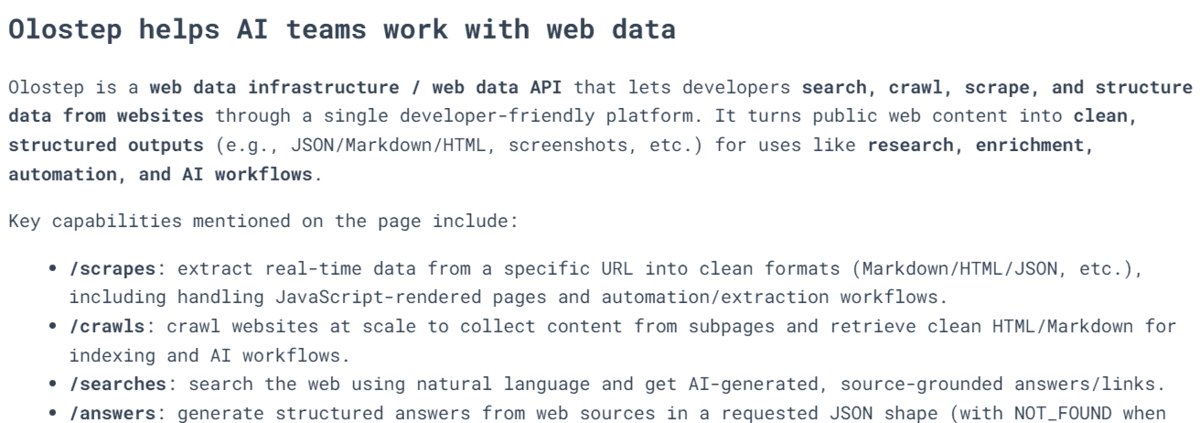
Scraper output for a company overview query | Image by Author
และทดสอบการหาข้อมูลเฉพาะเจาะจงอย่างแผนราคา ซึ่งปกติอาจต้องไล่หาในหน้าเว็บด้วยตัวเอง:
url = "https://www.olostep.com/pricing"
user_query = "Help me understand the pricing"
result = ai_web_scraper(url, user_query)

display(Markdown(result))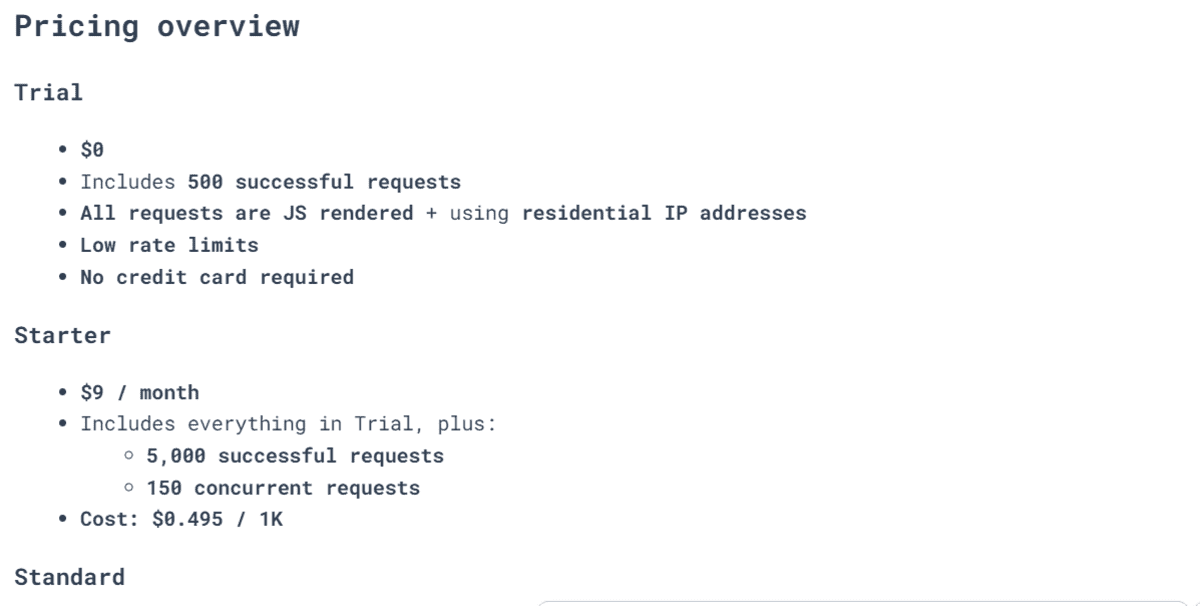
Scraper output for a pricing query | Image by Author
นอกจากนี้ คุณยังสามารถบันทึกผลลัพธ์เป็นไฟล์ Markdown เพื่อนำไปใช้งานต่อได้โดยง่าย:
with open("ai_scraper_result.md", "w", encoding="utf-8") as file:
    file.write(result)

print("Markdown saved to ai_scraper_result.md")
Final Thoughts
การสร้าง AI Scraper ด้วย Python และ LLM ช่วยให้เราเปลี่ยนข้อมูลเว็บไซต์ที่ซับซ้อนให้กลายเป็นคำตอบที่เข้าใจง่ายได้ในไม่กี่วินาที อย่างไรก็ตาม อย่าลืมคำนึงถึงต้นทุนในการเรียกใช้ API และการดูแลรักษาโค้ดในระยะยาวด้วย
หากคุณต้องการโซลูชันที่เสถียรสำหรับโปรเจกต์ขนาดใหญ่ การพิจารณาใช้เครื่องมือสำเร็จรูปอย่าง Olostep, Firecrawl หรือ Exa อาจคุ้มค่ากว่า แต่สำหรับการใช้งานเฉพาะทางหรืองานส่วนตัว การสร้างโซลูชันน้ำหนักเบาด้วยตนเองเช่นนี้ก็นับว่าเป็นทางเลือกที่ยอดเยี่ยม
ความคิดเห็น (0)
เข้าสู่ระบบเพื่อร่วมแสดงความเห็น
สมัครสมาชิกมาเป็นคนแรกที่แสดงความเห็นกันเลยโบร